


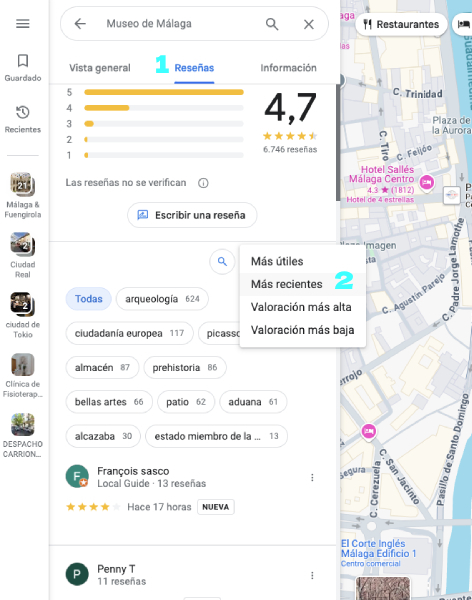
Since January 2025, many business profile managers on Google My Business or Google Maps have noticed an unexpected change: it’s no longer possible to sort Google reviews by date directly from the main Google Search view.
This has caused some confusion because, previously, you could easily organize reviews by date or rating. However, there’s a very simple solution to view reviews in chronological order by accessing Google Maps directly.
How to view the most recent Google reviews by date
Although this option no longer appears in the main Google Search view, you can still sort reviews to see the latest ones by date. Follow these steps:
- Go to Google Maps: instead of searching directly on Google, open Google Maps and search for the business you want to check.
- Select the business: click on the business name in the search results.
- Click on the “Reviews” tab: once inside the business profile, go to the “Reviews” tab.
- Sort the reviews: here you’ll find the option to sort Google reviews by date, allowing you to see the most recent feedback first.
Easy, right? Now you know how to view the latest Google reviews by date.
We recommend checking out this page if you want to manage and improve your Google reviews as well as your local SEO.